| Splak.net http://splak.net/forum/ |
|
| Motherboard http://splak.net/forum/viewtopic.php?f=3&t=2326 |
Page 1 of 4 |
| Author: | cursed sasuke [ Fri Aug 29, 2008 11:18 am ] |
| Post subject: | Motherboard |
i have NO knowledge of motherboards and i'm planning on getting one with a PCI-E slot, so i was wondering if someone could find something like that on newegg or something like that? (sorry if i sound demanding, lol) my case only has 4 slots, and 2 of which i use (wireless card and sound card), so i also need the motherboard to have 4 card slots, help is MUCH appreciated |
|
| Author: | Display [ Fri Aug 29, 2008 11:21 am ] |
| Post subject: | |
...you need to add a lot more information. Model # of your computer is most important to find out what motherboard you already have (unless you know that, then just tell us). Speaking of, if it's say a Dell or HP computer, I don't know if you will be able to install a new motherboard - based on Dell cases have a special way to that hold their motherboards. Not 100% sure though, you'd have to ask Cole on that. |
|
| Author: | ColeLT1 [ Fri Aug 29, 2008 11:37 am ] |
| Post subject: | |
Display is correct. |
|
| Author: | cursed sasuke [ Fri Aug 29, 2008 12:33 pm ] |
| Post subject: | |
i have a Gateway Desktop computer - http://www.shopping.com/xPF-Gateway-Gat ... D-DVD-RW-D it says 'video output interface' PCI Express' under motherboard (not sure if this is incorrect but i only have PCI and AGP slots) |
|
| Author: | Nevermind [ Fri Aug 29, 2008 12:51 pm ] |
| Post subject: | |
Im so glad I didn't buy a pre built computer. Also Cursed you might want to keep in mind your socket type of the MOBO (if Display hasn't already) so you can buy one that works with your current CPU. Or plan on shelling out some more $$$. |
|
| Author: | ColeLT1 [ Fri Aug 29, 2008 1:11 pm ] |
| Post subject: | |
cursed sasuke wrote: i have a Gateway Desktop computer - http://www.shopping.com/xPF-Gateway-Gat ... D-DVD-RW-D
it says 'video output interface' PCI Express' under motherboard (not sure if this is incorrect but i only have PCI and AGP slots) Are you sure you have AGP, you could have PCI express and think its AGP? |
|
| Author: | cursed sasuke [ Fri Aug 29, 2008 1:28 pm ] |
| Post subject: | |
the color of it is black, and a PCI-E is brown, right? i talked to bhavin about it and he said the black ones are AGP |
|
| Author: | cursed sasuke [ Fri Aug 29, 2008 1:46 pm ] |
| Post subject: | |
well, i guess i'm gonna be building my own computer (excited!) i'm gonna salvage all of my parts from my case atm (floppy drive, hard drive, PSU etc.) and a big thanks to Carlos, he recommended these for me http://www.newegg.com/Product/Product.a ... 6819117165 http://www.newegg.com/Product/Product.a ... 6813136043 http://www.newegg.com/Product/Product.a ... %20Hundred i'm also copy and pasting these cuz i won't be able to remember what they're called and search them up on newegg and there's not many posts on the tech issues section so, i should be able to find this easily |
|
| Author: | Display [ Fri Aug 29, 2008 1:52 pm ] |
| Post subject: | |
wtf is going on.. |
|
| Author: | cornholio [ Fri Aug 29, 2008 2:07 pm ] |
| Post subject: | |
FYI the motherboard i just got by doing best rateing lawl.♦ |
|
| Author: | cursed sasuke [ Fri Aug 29, 2008 2:20 pm ] |
| Post subject: | |
i needed a PCI-E x16 slot so i needed a new motherboard and i talked to carlos about it and he said if i wanted a new motherboard i'd probably end up building my own comp cuz the business won't let me take out the motherboard, the processor and the case is just some extra stuff, i just wanted to lay down the links to the case and processor so i didn't have to search for it on newegg, are you still with us now? lol |
|
| Author: | cornholio [ Fri Aug 29, 2008 2:30 pm ] |
| Post subject: | |
| Author: | ColeLT1 [ Fri Aug 29, 2008 3:02 pm ] |
| Post subject: | |
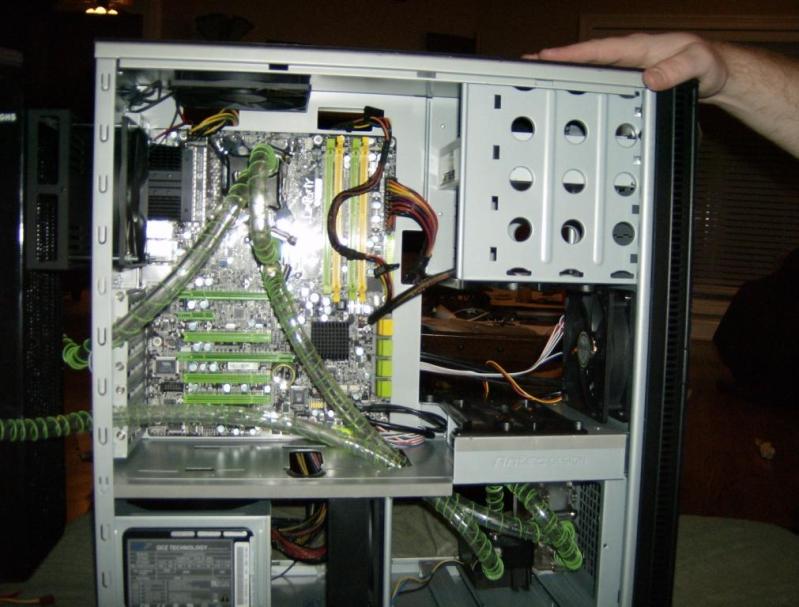
Dude.... My PCI express slots are green... color does not dictate what slot it is.... http://splak.net/computer/watercooled/HPIM0350.JPG palm-to-face If your specs say you have a pcieX16 slot, then you probably do.... |
|
| Author: | Display [ Fri Aug 29, 2008 3:28 pm ] |
| Post subject: | |
hahahah |
|
| Author: | Penguin [ Fri Aug 29, 2008 3:34 pm ] |
| Post subject: | |
Well, you need to keep in mind the year in which is computer was built. If it's an older version of that model (which Dell HAS done before, so other companies might) they may have just switched out some parts to make it more compatible with todays technology. Best thing to do is try to remember what year it was made, then search the model with the year on Google, and hope you find results to be sure. Otherwise.. you have pciex16 :P |
|
| Page 1 of 4 | All times are UTC - 6 hours [ DST ] |
| Powered by phpBB® Forum Software © phpBB Group https://www.phpbb.com/ |
|